
DnsMint
Create verification records in DNSMint
| Plugin type | DNS validation | |
|---|---|---|
| Download | Version v2.4.1. Look for older releases on GitHub for files named like plugin.validation.dns.dnsmint.v2.x.x.zip | |
| Chocolatey | choco install simple-acme-validation-dns-dnsmint(details) |
|
| Compatibility | All platforms |
Description
Create the record at DNSMint.
Plugins needs to be unpacked into a folder called %programdata%\simple-acme\plugins. Depending on how you downloaded the file, you may have to unblock the .dll files before your computer will trust them. You can do that from the File Explorer by using the right mouse button and then checking the `Unblock` box on the General tab.
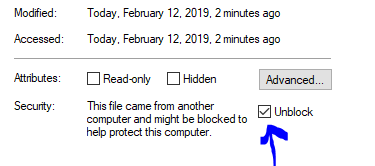
To verify that the plugin is properly installed you can start the main executable
with ‑‑verbose and it will print information about found and loaded plugins at
start up. When the plugin is loaded, it manifests itself as extra menu choices and
command line parameters being made available.
All releases published to third party package managers like Chocolatey, WinGet and NuGet support plugins, but if you download simple-acme manually, you must choose a pluggable version instead of the trimmed one to use it.
Command line
--validation dnsmint |
Activates the plugin | |
|---|---|---|
‑‑apikey |
DNSMint API key, carrying the dns01:write scope.
You may pass the secret in plain text, but can also use a reference to the secret vault like |
Examples
| Typical | --validation dnsmint ‑‑apikey ***** |
|---|
JSON
| ID | 87b5008b-62f2-4dd6-9fd7-30b46e4ddfd5 |
|---|
Looking for win-acme?
simple-acme is a backwards compatible, drop-in replacement built by the same person. Project history.